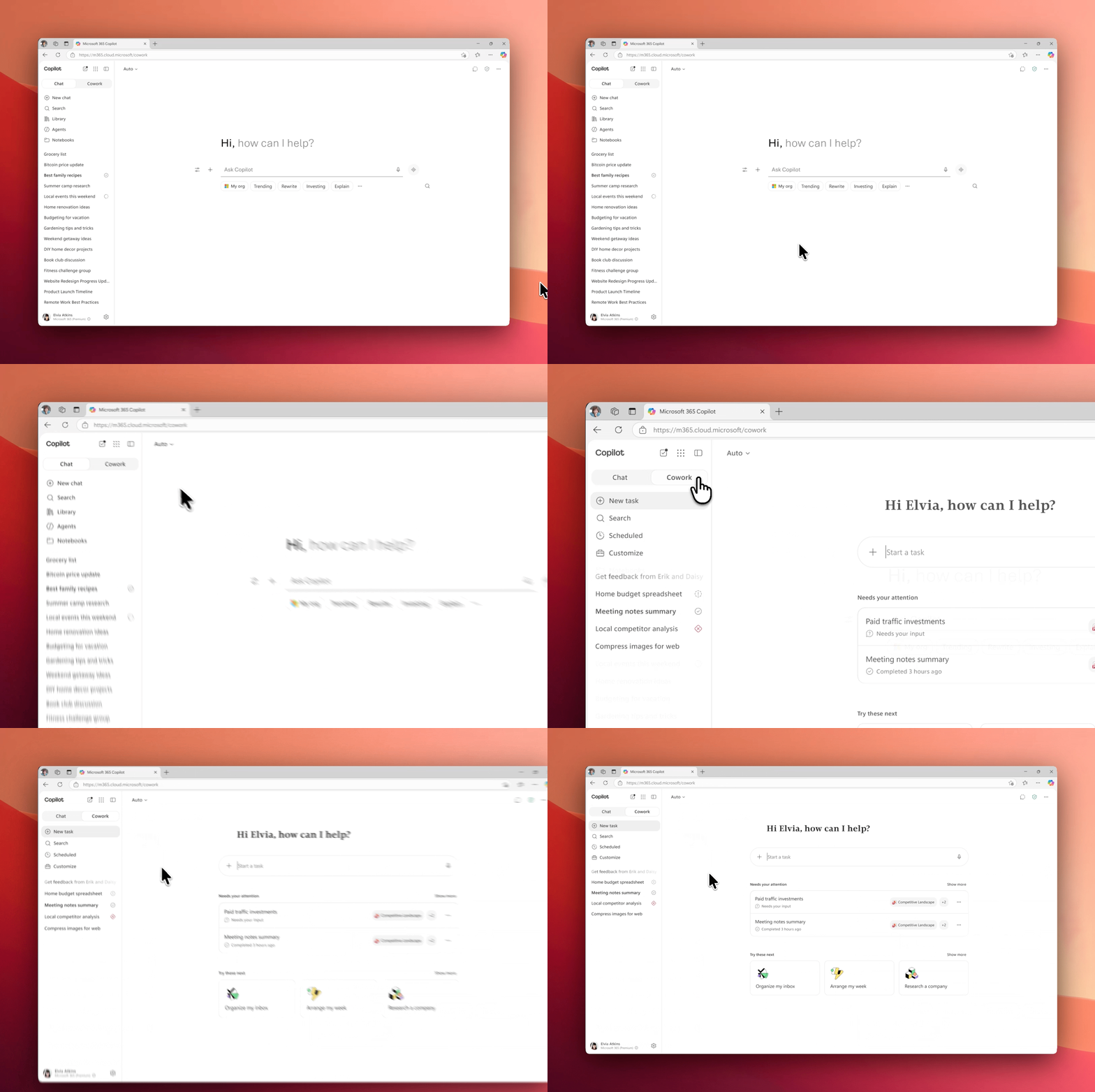
Watch how it works
See how Cowork takes a high-level ask and turns it into a finished workstream. Research, drafts, calendar updates, and follow-ups — all in minutes
 Microsoft Adoption
 Microsoft 365 Copilot Cowork
Copilot Cowork is an agentic system that plans, executes, and delivers work. It coordinates long-running, multi-step workflows across your apps, files, and data. Powered by Work IQ, it integrates signals from your work graph and applies task-appropriate models to produce context-aware results.
See how Cowork takes a high-level ask and turns it into a finished workstream. Research, drafts, calendar updates, and follow-ups — all in minutes

Describe the outcome, like “prep me for Thursday’s client review”. Cowork plans the steps, gathers inputs, and executes across your apps.
Draft and send emails, post updates in Teams channels and chats, create HTML newsletters, and prepare polished stakeholder communications — all from a single conversation.
Create Word docs, Excel spreadsheets, PowerPoint decks, and PDFs from scratch. Edit existing files, browse your OneDrive and SharePoint, and reorganize content into new or existing folders.
Schedule meetings, resolve conflicts, protect focus time, and get pre-read briefings so you walk in with confidence.
Find documents, messages, and information across your organization. Run deep research that synthesizes multiple sources into comprehensive reports.
Schedule work on a recurring basis. Whether it’s daily briefings, weekly digests, or end-of-day wrap-ups, Cowork takes care of the follow-ups for you.
Explore what Copilot can do with our most popular prompts.
Help rewriteCan you help me rewrite this paragraph to make it clearer and more concise?
Explore a topicI have a topic that I’m interested in and would like to learn more. Can you walk me through the basics and help me go deeper as we talk?
Summarize your emailYou are my email analyst. Review all unread emails in my outlook inbox and summarize each on in a structured table.
Follow up on emailsPlease summarize the emails I’ve received over the past two weeks and priortize them based on urgency.
You define the work and Cowork runs it end-to-end and returns a completed result, not just a draft or a recommendation. The built-in multi model design brings model flexibility by automatically choosing the right model for the right task to optimize performance and cost across scenarios.
Work IQ, the intelligence layer, personalizes Cowork to you and your organization to understand real work in context. It’s built on Microsoft 365 security and compliance controls.
Read our announcement for more details.
Chat, Cowork, and agents each serves a different purpose. Use the table below as a quick reference for those conversations.
| Chat | Cowork | Agents | |
|---|---|---|---|
| Best for | Conversational AI for drafting, Q&A, and ideation | Delegate and execute long-running, multi-step work across your apps | Ready-made agents for specialized or repeatable tasks |
| How you interact | A conversation: You steer each step from prompt → response | An assignment: You describe the goal, check in at key milestones | A workflow: You pick an agent built for a specific job |
| Typical work pattern | You’re in the loop: One prompt, one result, then you choose what’s next | You step away: Cowork plans, manages files and tasks across apps, and delivers completed work | You run it on demand: The agent handles the same scoped task each time |
Concrete examples of what a Cowork task can look like. They show not only how Cowork can work autonomously but also leverage Work IQ for contextual results.
Cowork reviews the week and proposes calendar changes for you to approve.
This is a common problem everyone has, which makes it a strong first scenario for the team. The inputs sit entirely in your own calendar, and the approval checkpoint makes it low risk.
Example prompt:
“Review my calendar for next week. Flag any conflicts, double-bookings, or meetings I’m only optionally required for. Propose declines or reschedules for anything that looks low-value and suggest where I could block focus time. Walk me through each change one at a time and only act after I approve.”
Cowork helps sellers review the pipeline, surfacing what needs attention and taking action deal by deal.
This is recurring, multi-app work with direct customer impact, which is why the approval checkpoint matters most in this scenario.
Cowork builds the onboarding package piece by piece, sequencing day-one blockers first.
This is high coordination work that managers usually spread across weeks, compressed into a single working session.
Most Cowork outcomes depend on how clearly you scope your request. A prompt like “clean up my calendar” leaves too much open to interpretation, so Cowork has to guess what you want, which shapes the results you get. Be specific about what success looks like when you ask. Start with this guide:
Example, before:
“Help me prep for my offsite next week.”
Example, after:
“Outcome: A briefing pack and a draft agenda for the offsite on June 12. Inputs: The offsite invite, the three pre-reads I attached to it, and emails from the offsite distribution list in the last two weeks. Definition of done: A one-page Word doc saved to my OneDrive Offsite folder, and a draft agenda emailed to my direct reports for feedback. Constraints: No external attendees. Approval scope: Default — review the email before sending.”
These packs provide real-world examples to help you move beyond single prompts to complete workflows. Use them to explore how Cowork can help with lightweight tasks, everyday workflows, and hard problems to deliver complete, usable results with plugins you may already have.
Explore what Copilot can do with our most popular prompts.
Pipeline reviewHelp me work my pipeline. Please review my open opportunities…
New hire onboardingHelp me onboard my new hire. Please review their first two weeks…
Prep for a meeting“Help me prepare for an upcoming meeting. Please review my…
Organize my inbox“Help me organize my inbox. Please review my email from Outlook…
Microsoft 365 Copilot Cowork requires a Microsoft 365 Copilot license and is available in Copilot tenants. IT administrators control who can access it and can deploy and pin it using standard Copilot governance tools.
If Cowork is turned on for you, select the Cowork toggle in Microsoft 365 Copilot to jump in. Don’t see the toggle at all? Contact your IT admin to get access.
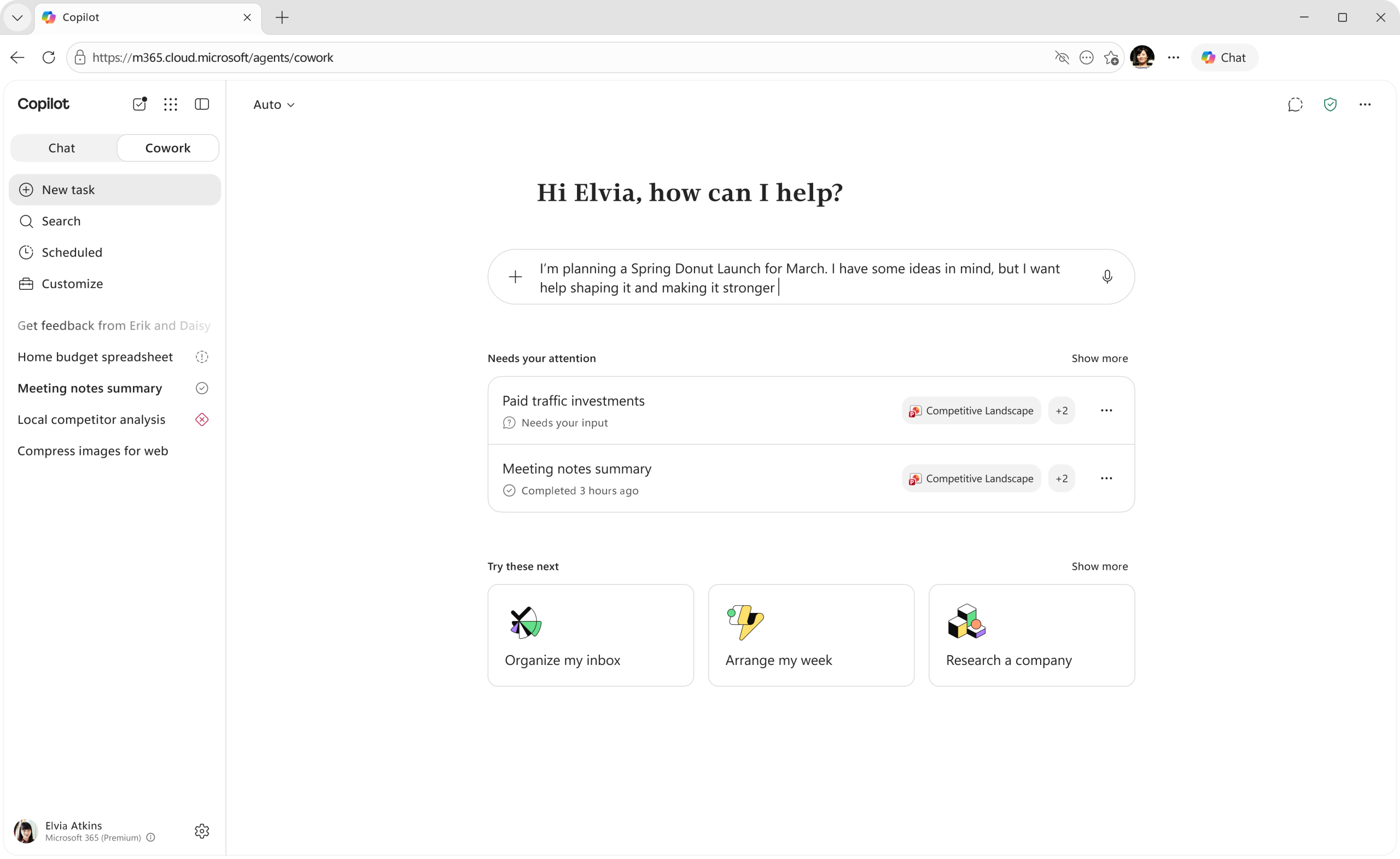
The Cowork toggle sits at the top of your left navigation in Microsoft 365 Copilot, next to Home. Select Cowork to switch into the experience.
Learn moreSelecting it opens your personalized homepage with suggested tasks tailored to your recent work.
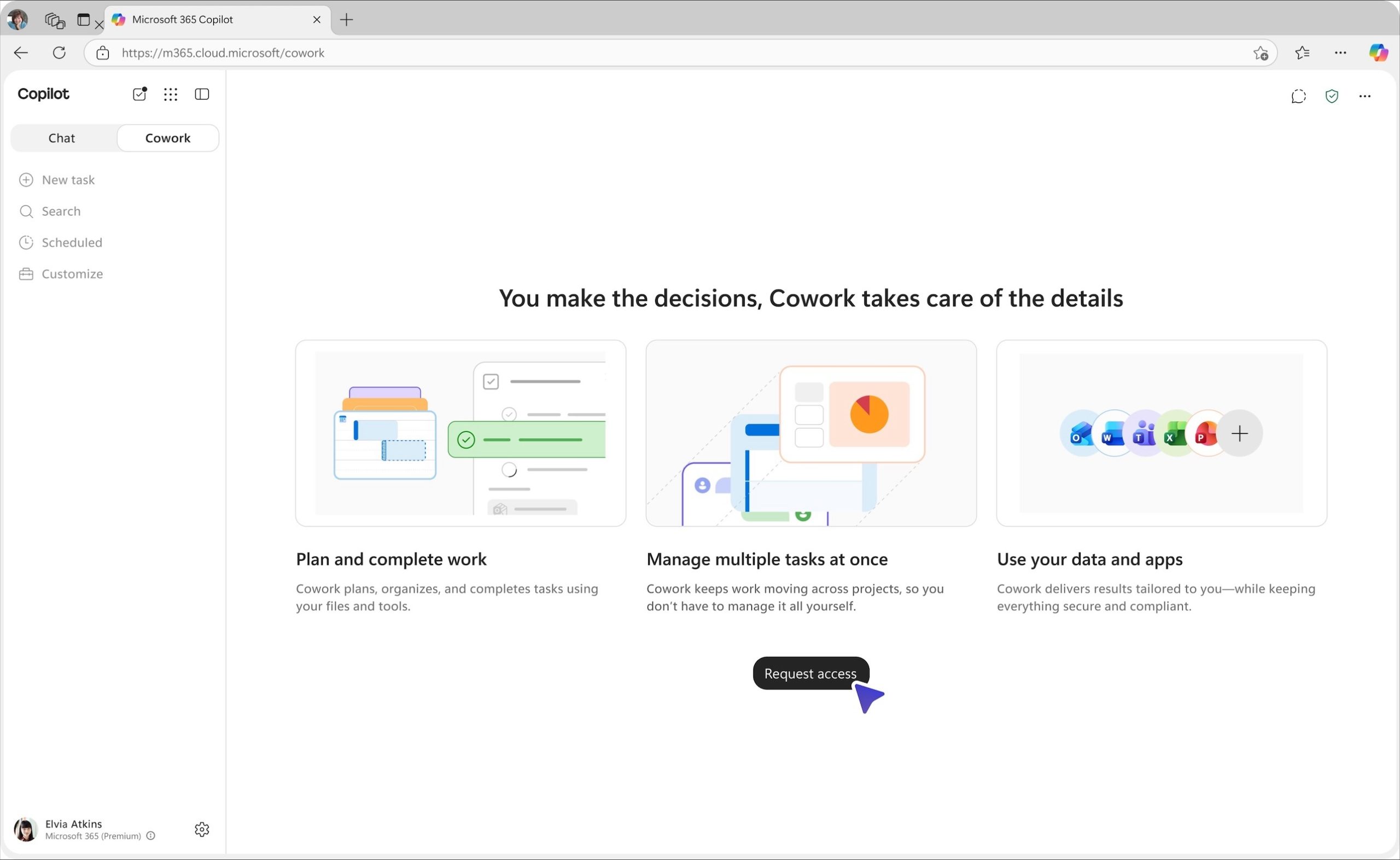
Learn moreIf you can see the Cowork toggle, but it isn't switched on for you yet, selecting it opens a brief overview of what Cowork does with a one-click Request access button. Once your request is approved, you're ready to go.
Learn moreWhen you reach your usage limit, you can request more credits by clicking on ``Request more``. Once your admin approves, you're notified both in the product and by email.
Learn moreWhere developers connect, learn, and build solutions on Microsoft platforms.
Get connectedFind interest-based skilling playlists.
Advanced resources for IT Pros and admins, Champions and Adoption Managers, and Leadership.
Explore our collection of skilling courses for Copilot and agents for IT Pros and Developers.
Cowork requires a Microsoft 365 Copilot license. If you and your team already have Copilot, check with your IT admin or adoption and change management lead to find out when Cowork will be available. Once enabled, Cowork will appear inside Microsoft 365 Copilot (web or the app) in the same place you already find Chat.
Keep in mind that Cowork requires more capacity than Chat, because each task runs through many steps. If your team hits usage limits or other constraints, loop in the same contact for guidance.
Read our announcement for more details.
Identify starter scenarios, run working sessions, troubleshoot issues, and share examples that help the team accelerate productivity.
Objective: Get the team into Cowork with the context to use it confidently.
Objective: Move from awareness to active use by celebrating completed work.
Objective: Turn early use into a story to share with leaders and the team.
Objective: Sustain momentum by plugging into our communities.
Most Cowork outcomes come down to scoping. A request like “clean up my calendar” doesn’t tell Cowork what “clean” means, which shapes everything Cowork does next. Coaching the team on scoping is one of the most critical things a Champion can do. Start with this guide:
Example, before:
“Help me prep for my offsite next week.”
Example, after:
“Outcome: A briefing pack and a draft agenda for the offsite on June 12. Inputs: The offsite invite, the three pre-reads I attached to it, and emails from the offsite distribution list in the last two weeks. Definition of done: A one-page Word doc saved to my OneDrive Offsite folder, and a draft agenda emailed to my direct reports for feedback. Constraints: No external attendees. Approval scope: Default — review the email before sending.”
These packs provide real-world examples to help you move beyond single prompts to complete workflows. Use them to inspire your team on how Cowork can help with lightweight tasks, everyday workflows, and hard problems to deliver complete, usable results with plugins you may already have.
Explore what Copilot can do with our most popular prompts.
Pipeline reviewHelp me work my pipeline. Please review my open opportunities…
New hire onboardingHelp me onboard my new hire. Please review their first two weeks…
Prep for a meeting“Help me prepare for an upcoming meeting. Please review my…
Organize my inbox“Help me organize my inbox. Please review my email from Outlook…
Where developers connect, learn, and build solutions on Microsoft platforms.
Get connectedFind interest-based skilling playlists.
Advanced resources for IT Pros and admins, Champions and Adoption Managers, and Leadership.
Explore our collection of skilling courses for Copilot and agents for IT Pros and Developers.
Read our announcement for more details.
star
Work with your AI Council members and stakeholders to prioritize access for roles where AI delivers the highest ROI. Start there, measure the impact, and expand access as results come in.
shield
Cowork uses existing Microsoft 365 controls, but your IT and security teams own the levers. Align on these before enabling Cowork.
lightbulb
Cowork is the most autonomous Copilot experience to date. Discuss with your AI Council which categories of work it’s appropriate for, what guardrails apply, and how you measure whether it’s working.
money
Cowork usage runs on Copilot Credits. This is a budgeting and technical decision. Partner with your leads to set your budget and switch on for the right users. Use this Customer Cowork Estimator to help size your budget.
Learn how Copilot Cowork pricing works, how to estimate your spend, and the controls we’re giving you to manage it.
Cowork moves you work from to-do to done.
Explore what Copilot can do with our most popular prompts.
Pipeline reviewHelp me work my pipeline. Please review my open opportunities…
New hire onboardingHelp me onboard my new hire. Please review their first two weeks…
Prep for a meeting“Help me prepare for an upcoming meeting. Please review my…
Organize my inbox“Help me organize my inbox. Please review my email from Outlook…
Where developers connect, learn, and build solutions on Microsoft platforms.
Get connectedFind interest-based skilling playlists.
Advanced resources for IT Pros and admins, Champions and Adoption Managers, and Leadership.
Explore our collection of skilling courses for Copilot and agents for IT Pros and Developers.
The same commitments and controls that protect your data in Microsoft 365 apply to Copilot Cowork:
Read our announcement for more details.
Cowork acts as the user, inside the same permission, label, and policy surface they already work in. Sensitive actions like send, post, share, schedule, or change, all wait at a checkpoint for user approval before they run. Cowork also runs inside your existing Microsoft 365 security and compliance posture. There’s no new stack to learn and no separate policy surface to manage.
Different tasks need different strengths; deep reasoning, fast synthesis, or structured analysis. Cowork applies the right model to each step of a task, without breaking context. The result is higher-quality output delivered in the flow of work, with enterprise controls firmly in place.
If you plan to use Anthropic models with Cowork, confirm they are enabled in your tenant. Learn more: Manage Anthropic models.
Cowork requires a Microsoft 365 Copilot license and becomes available once you set up credit-based billing. You decide who gets access: enable for everyone or for specific groups. You can also turn on the discovery setting so Cowork is ready for users when they open Copilot. Learn more about the discovery toggle.
Before you begin:
Cowork uses Copilot Credits, a single, pooled billing currency that meters AI usage across Copilot services and agents. Credits are shared at the tenant level, with policy controls to assign limits by group or user. Credit usage per task depends on the mix of tokens used, models used, data and tools invoked, and safety/policy checks performed.
You fund Credits two ways, and most organizations use both together.
| Prepaid Copilot Credits | Pay-as-you-go Copilot Credits | |
|---|---|---|
| Best for | Predictable, committed usage | Flexibility to scale up or down |
| Term | Annual | No commitment |
| Cost | Lowest per-credit cost | $0.01 USD per credit |
How to think about the two:
All credit-based billing is configured in the Microsoft 365 admin center: Copilot → Cost Management → Configuration. At a high level, here’s what you’ll do:
Three situations come up most often. Each maps to a control you have in Cost Management within the admin center.
Before you set spending limits, model expected costs with your early adopters so your budgets reflect real usage rather than arbitrary caps. Follow the recommended steps below or use the Customer Cowork Estimator to help size your budget.
Objective: Ensure your security and identity posture is ready for Cowork to take action.
Objective: Identify which users to enable Cowork for.
Determine the group of business users that will get the most value from this capability. Work with stakeholders and adoption staff to designate these people.
Objective: Make Cowork available to your pilot group with the controls you want from day one.
Objective: Turn on Copilot Credits with spend controls.
Objective: Turn the early adopters’ usage into a story you can share, then expand access with confidence.
Objective: Watch the patterns, catch problems early, and build a repeatable governance rhythm.
Cost Management in the admin center gives you credit-usage visibility from day one:
Pair this with the Microsoft Purview audit log, where Cowork actions are recorded alongside the rest of your estate.
Service health reviews (SHR) are where the implementation team and business stakeholders come together to review the insights from their AI transformation projects. Gather your AI Council members and stakeholders to understand usage patterns, challenges, and success stories. Use the Microsoft 365 admin center and the Copilot Dashboard data for these check-ins along. Use insights to alter continued deployment and adoption plans.
Explore what Copilot can do with our most popular prompts.
Pipeline reviewHelp me work my pipeline. Please review my open opportunities…
New hire onboardingHelp me onboard my new hire. Please review their first two weeks…
Prep for a meeting“Help me prepare for an upcoming meeting. Please review my…
Organize my inbox“Help me organize my inbox. Please review my email from Outlook…
Where developers connect, learn, and build solutions on Microsoft platforms.
Get connectedFind interest-based skilling playlists.
Advanced resources for IT Pros and admins, Champions and Adoption Managers, and Leadership.
Explore our collection of skilling courses for Copilot and agents for IT Pros and Developers.
Funding variable AI work is a new discipline for most finance organizations, and adoption is accelerating. The FinOps Foundation, the Linux Foundation’s industry body for technology cost management, reports that 98% of organizations now manage AI spend, up from 31% two years prior, and that AI cost management is the top skill their teams need to develop.
As a finance leader, you already fund Microsoft 365 Copilot as an enterprise capability. Cowork is your next decision: it shifts AI from assisting to executing. That changes what you fund and how it’s priced, moving from a fixed per-seat license to a variable investment that scales with the work you run. As agents take on execution, funding Cowork becomes a capital-allocation decision about which work earns the investment.
| Copilot | Cowork | |
|---|---|---|
| What you fund | AI capability across the organization | Execution of the work itself |
| The cost model | Fixed, per seat | Variable, by usage |
| How spend scales | With headcount | With the work you run |
It executes multi-step work across Microsoft 365, completing workflows that coordinate across tools, data, and teams. A team assigns an outcome, and Cowork operates across Microsoft 365 connected systems and your business data, and returns a completed result.
Examples include:
Microsoft 365 Copilot licensing remains the foundation. Cowork introduces usage-based spend through Copilot Credits. Cost reflects the workflows your teams run rather than access alone.
Credit spend varies based on the volume and complexity of workflows run through Cowork, giving you a more direct connection between spend and operational activity. Business units of similar size can show different spend patterns based on how they use Cowork.
A workflow’s cost scales with its complexity, the systems and data it touches, and the actions it takes. Heavier reasoning and higher-quality outputs draw on more capable models and cost more than simple retrieval.
Cowork is metered in Copilot Credits, a single pooled currency governed at the tenant level. Cost scales with the work performed, not the number of seats. This gives you direct control over where AI investment goes and what it returns. Credits are funded two ways, and most organizations use both.
| Prepaid | Pay-as-you-go | |
|---|---|---|
| Best for | Predictable, committed usage | Flexibility to scale up or down |
| Term | Lowest per-credit cost | $0.01 USD per credit |
| Cost | Sets your budgeted baseline | Absorbs pilots, spikes, and seasonality |
| Role | Sets your budgeted baseline | Absorbs pilots, spikes, and seasonality |
AI spend becomes a managed investment that scales with results. Capacity can be allocated, capped, and redirected as workflows prove their value. Budgets and limits are set centrally, keeping consumption visible and controlled. Existing work continues without disruption.
Cowork spend aligns directly to usage and is managed in the Microsoft 365 admin center, using the same governance controls your organization already uses. That shifts budgeting from headcount to workflows. Investment is defined by business scenarios, allocated capacity, and how usage is allowed to expand.
You set budget, prioritization, and guardrails at the executive level. Those decisions are implemented through group-level access, credit allocation, and billing policies that control Cowork use. Budgets, limits, and alerts enforce those decisions. Spend can be actively managed and adjusted because usage is metered and visible in real time.
Cowork usage is visible across the organization at the enterprise (tenant), business unit (group), and user level. This provides a clear view of consumption and how it evolves over time.
Because usage is metered and observable, spend can be traced to the team or user that ran it. This ties cost to actual usage rather than seat count alone.
At the leadership level, this visibility turns usage data into a management input. It shows where investment is concentrated, how spend aligns to teams and priorities, and where spend may expand.
For a more detailed overview on cost management, read the e-book: A New Model for AI Spend
Setting investment criteria is a shared responsibility between finance and IT. Finance sets the priorities, budgets, and outcomes that matter. IT implements those decisions through policy, execution, and ongoing reporting. Cowork spend reflects how usage-based investment is allocated across the enterprise. Finance leaders set the criteria for where that investment goes, what outcomes it must support, and what evidence is needed before usage expands.
The strongest candidates are workflows that:
These are the scenarios where Copilot Cowork, operating across Microsoft 365, executes multi-step work and returns outputs that can be governed, reused, and evaluated against business priorities.
Every workflow is an investment decision. Success means concentrating funding on the workflows that create the most value, and using data to decide which ones qualify before spend scales.
A defined baseline gives finance and business leaders the data to make that decision. This includes:
This creates a clear, data-driven basis for deciding whether a workflow merits continued or expanded investment.
Forrester’s commissioned Total Economic Impact™ Of Microsoft 365 Copilot study projects 116% ROI and $19.7M NPV* for a composite enterprise on Microsoft 365 Copilot, and early adopters are scaling on those results: Lloyds Banking Group (30,000 licenses, 93% daily usage) and Allegis Group (150,000 hours and $1.5M saved).
*These reflect per-seat Microsoft 365 Copilot, not Cowork usage; Cowork-specific ROI will be quantified once the ROI Assessment Tool and ~90 days of data are available.
Usage data shows which workflows are running, how often they run, and where consumption is concentrated. Outcome signals show whether those workflows produce results that support continued funding. As Cowork scales, funding decisions move from upfront estimates to observed performance. Together, those signals help finance leaders determine where to expand investment, where to refine scope, and where to constrain usage before spend grows further.
Explore what Copilot can do with our most popular prompts.
Pipeline reviewHelp me work my pipeline. Please review my open opportunities…
New hire onboardingHelp me onboard my new hire. Please review their first two weeks…
Prep for a meeting“Help me prepare for an upcoming meeting. Please review my…
Organize my inbox“Help me organize my inbox. Please review my email from Outlook…
Microsoft 365 Copilot Cowork requires a Microsoft 365 Copilot license and is available in Copilot tenants. IT administrators control who can access it and can deploy and pin it using standard Copilot governance tools.
If Cowork is turned on for you, select the Cowork toggle in Microsoft 365 Copilot to jump in. Don’t see the toggle at all? Contact your IT admin to get access.
The Cowork toggle sits at the top of your left navigation in Microsoft 365 Copilot, next to Home. Select Cowork to switch into the experience.
Learn moreSelecting it opens your personalized homepage with suggested tasks tailored to your recent work.
Learn moreIf you can see the Cowork toggle, but it isn't switched on for you yet, selecting it opens a brief overview of what Cowork does with a one-click Request access button. Once your request is approved, you're ready to go.
Learn moreWhen you reach your usage limit, you can request more credits by clicking on ``Request more``. Once your admin approves, you're notified both in the product and by email.
Learn moreWhere developers connect, learn, and build solutions on Microsoft platforms.
Get connectedFind interest-based skilling playlists.
Advanced resources for IT Pros and admins, Champions and Adoption Managers, and Leadership.
Explore our collection of skilling courses for Copilot and agents for IT Pros and Developers.